Settings
You can configure Editor and Player settings using the Settings window. It can be retrieved from: WEAVR > Settings.
warning
Changing the following parameters may lead to WEAVR malfunction. It is therefore not recommended to modify.
Editor Settings
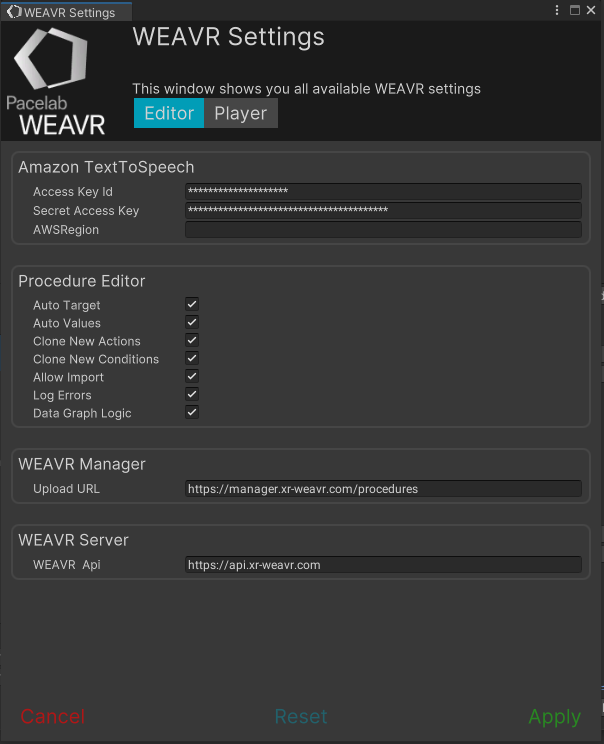
Amazon TextToSpeech
Credentials to use the Amazon TTS during the WEAVR procedure. To use Amazon TTS, instead of Windows TTS, make sure the internet connection is enabled.
| Field | Description |
|---|---|
| Access Key Id | First part of the user id |
| Secret Access Key | Second part of the user id |
| AWSRegion | The hand point region |
Procedure Editor
General settings for the procedure editor.
| Setting | Description |
|---|---|
| Auto Target | When creating new actions or conditions, the target is set from previous actions/conditions |
| Auto Values | When creating new actions or conditions, their values are set automatically from previous actions/conditions |
| Clone New Actions | The newly created action copies all the values from previous action of the same type |
| Clone New Conditions | The newly created action copies all the values from previous condition of the same type |
| Allow Import | Whether to allow or not the import of legacy procedures |
| Log Errors | Whether to log the errors to the console or not |
| Data Graph Logic | Whether to use graph logic for various calculations (e.g., reachability, shortest path, etc.) |
WEAVR Manager
URL to upload procedures to the server.
| Setting | Description |
|---|---|
| Upload URL | Address for WEAVR server upload API's |
WEAVR Server
URL address to download procedures.
| Setting | Description |
|---|---|
| WEAVR Api | Base URL for WEAVR manager |
Player Settings
The Player settings are used for testing procedures inside WEAVR Creator.
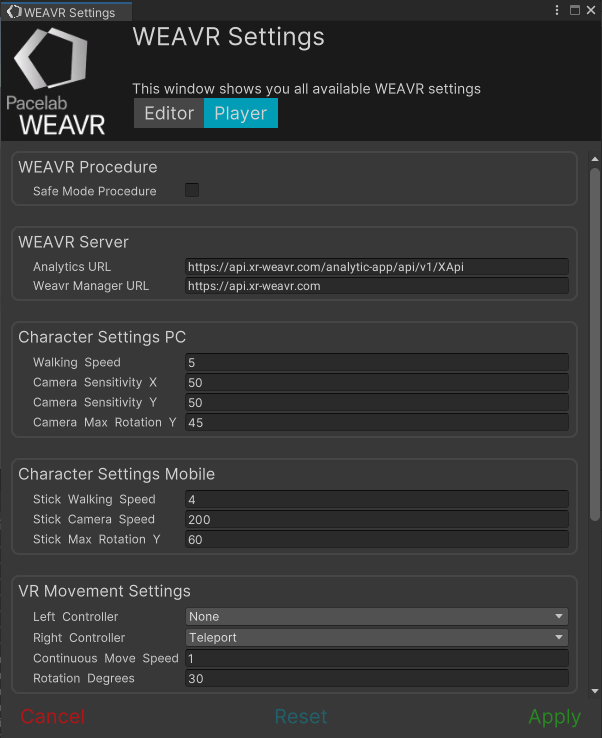
WEAVR Procedure
| Setting | Description |
|---|---|
| Safe Mode Procedure | If true the procedure will be executed ignoring the errors |
WEAVR Server
| Setting | Description |
|---|---|
| Analytics URL | URL for analytics web server |
| WEAVR Manager URL | Base URL for WEAVR Manager |
Character Settings PC
| Setting | Description |
|---|---|
| Walking Speed | Character movement speed |
| Camera Sensitivity X-Y | Look around speed on X/Y-axis rotation |
| Camera Max Rotation Y | Maximum look around angle on the y-axis |
Character Settings Mobile
| Setting | Description |
|---|---|
| Stick Walking Speed | Character movement speed based on touch stick |
| Stick Camera Speed | Look around speed on x and y axis based on touch stick |
| Stick Max Rotation Y | Maximum look around angle on the y-axis based on touch stick |
VR Movement Settings
| Setting | Description |
|---|---|
| Left Controller | Movement type for Left Controller |
| Right Controller | Movement type for Right Controller |
| Continuous Move Speed | Speed value for continuous movement |
| Rotation Degrees | How many degrees to rotate the Player using the joystick |
Touch Gesture Settings Mobile
| Setting | Description |
|---|---|
| Touch Pan Sensitivity | Sensitivity value for the touch pan gesture on mobile |
| Touch Rotate Sensitivity | Sensitivity value for the touch rotate gesture on mobile |
| Touch Zoom Sensitivity | Sensitivity value for the touch zoom gesture on mobile |
Mouse Gesture Settings Desktop
| Setting | Description |
|---|---|
| Mouse Pan Sensitivity | Sensitivity value for the mouse pan gesture on desktop |
| Mouse Rotate Sensitivity | Sensitivity value for the mouse rotate gesture on desktop |
| Mouse Zoom Sensitivity | Sensitivity value for the mouse zoom gesture on desktop |