Variable Conditions
The Variables group contains the following conditions:
- Get Variable
- Variable Value Changed
- Check Variable Time
Get Variable Condition
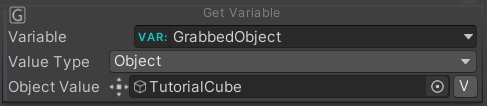
The Get Variable condition is verified when a variable value equals the target value.
| Property | Function |
|---|---|
| Variable | Enter the name of the variable to be checked. The variables inside this list are inside the Variables tab of the procedure graph. |
| Value Type | Select the type of the variable to be checked. |
| Value | The value that you want to check, it depends on the type. |
Variable Value Changed Condition

The condition is true when the value of the indicated variable has changed.
| Property | Function |
|---|---|
| Variable | Enter the name of the variable to be checked. The variables inside this list are inside the Variables tab of the procedure graph. |
Check Variable Time
The Check Variable Time condition works with time variables (timer or stopwatch). It becomes true each time the time variable hits a multiple of the given period — for example with a period of 60 it triggers every minute. Use it together with the Manage Time Variable action.

| Property | Function |
|---|---|
| Source | The time variable to check. |
| Period | The period (in seconds): the condition is satisfied whenever the time variable reaches a multiple of this value. |