UI Components
These components are useful inside UI elements or canvases. In this section you will learn about the following components:
- Long Press Button
- Text Format Filter
- Timer Formatter
- Time Text
- World Pointer Canvas
Long Press Button
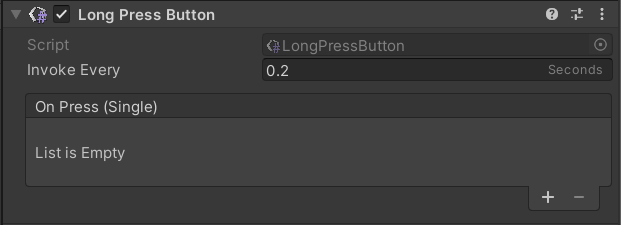
This component makes a unity button a button that can be held down for a specified amount of time.
| Property | Function |
|---|---|
| Invoke Every | Invoke the unity event every defined seconds. |
| On Press | Unity Event. |
Text Format Filter

This component is useful to format a value (like a date) of a text component.
| Property | Function |
|---|---|
| Target | Target TMP text component. |
| Format | Desired format. |
Timer Formatter

The Timer Formatter component is used with the Generic Timer component to display time in the defined format on the listed texts. Furthermore, this component expands the existing events that check the passing time.
If the Generic Timer and Timer Formatter components are in the same GameObject, they synchronize without using an event.
| Property | Function |
|---|---|
| Format | Enter the needed time format: hh for hours, mm for minutes, ss for seconds, and fff for milliseconds. |
| Time Texts | Text used as timer. |
Time Text
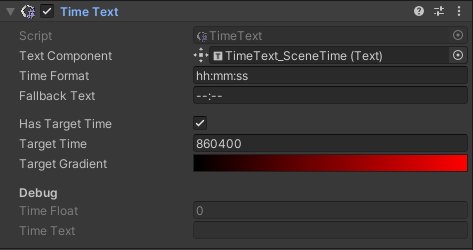
The Time Text component is used together with the Generic Timer and Text components to change the text color when the Target time property is reached.
| Property | Function |
|---|---|
| Text Component | Text displaying the time. |
| Time Format | Time format: hh for hours, mm for minutes, ss for seconds, and fff for milliseconds. |
| Fallback Text | Default text if Time Text is disabled. |
| Has Target Time | If checked, enables target time system. |
| Target Time | Target time (in seconds). |
| Target Gradient | Text color before and after reaching the target. |
World Pointer Canvas
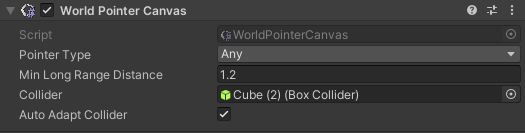
This component allows you to interact with canvases in VR.
| Property | Function |
|---|---|
| Pointer Type | Which pointer type this canvas can accept. Any = any pointer will be accepted. Long range (laser pointers) will work up to a min distance, short range (touch) will take over from there. Short Range = only short-range pointers will be accepted (e.g. touch pointer). Long Range = only long-range pointers will be accepted (e.g. laser pointer). |
| Min Long Range Distance | The minimum distance from which the long-range will be activated for this canvas. |
| Collider | The collider required for short-range pointers to block them passing through the canvas. |
| Auto Adapt Collider | [EditorOnly] If true, the collider will adapt to canvas size when it changes. |