Audio Actions
Windows Voice and Amazon TTS are both supported. To use Amazon TTS, you should compile the WEAVR Settings and have a valid internet connection.
Play Audio Action
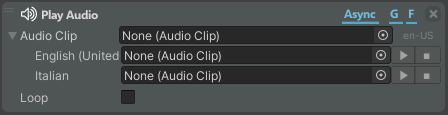
| Property | Description |
|---|---|
| Audio Clip | Audio Clip to be played. You can set different audio clips to be played for different languages. |
| Loop | If enabled, the audio is reproduced in a loop (this parameter is invisible if the action is not Async). |
Play Audio on Target
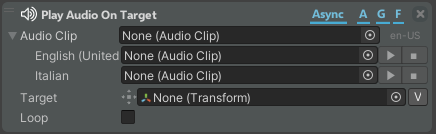
The Play Audio on Target action plays the indicated audio from the referenced target Object of the scene.
| Property | Description |
|---|---|
| Audio Clip | Audio Clip to be played. You can set different audio clips to be played for different languages. |
| Target | Object for which the audio is played. |
| Loop | If enabled, the audio is reproduced in a loop (this parameter is invisible if the action is not Async). |
Play Audio at Position
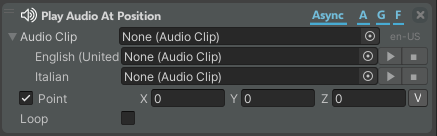
The Play Audio at Position action plays the indicated audio when you are in the needed position in the scene.
| Property | Description |
|---|---|
| Audio Clip | Audio Clip to be played. You can set different audio clips to be played for different languages. |
| Point | Position in the coordinate system where to play the audio in respect to the center of the scene. If disabled, the audio is heard on the background of the scene. |
| Loop | If enabled, the audio is reproduced in a loop (this parameter is invisible if the action is not Async). |
Text to Speech
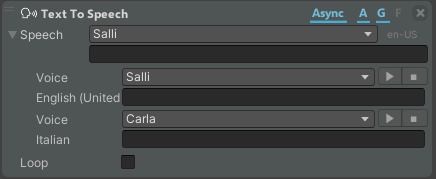
The Text to Speech action converts the text into audio that will be reproduced on the background of the scene.
| Property | Description |
|---|---|
| Speech | Voice and text to be reproduced. You can reproduce different voices and texts for different languages. |
| Voice | Define the voice that reads the text (different according to languages). |
| Text | Text to be reproduced by the TTS voice. |
| Loop | If enabled, the audio is reproduced in a loop (this parameter is invisible if the action is not Async). |
Text to Speech on Target
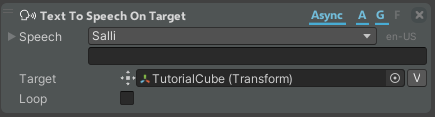
The Text to Speech on Target action converts the text into audio that will be reproduced from the referenced Object of the scene.
| Property | Description |
|---|---|
| Speech | Voice and text to be reproduced. You can reproduce different voices and texts for different languages. |
| Target | Object for which the audio is played. If null, the audio is heard on the background of the scene. |
| Loop | If enabled, the audio is reproduced in a loop (this parameter is invisible if the action is not Async). |
Text to Speech at Position

The Text to Speech at Position action converts the text into audio when you are in the needed position in the scene.
| Property | Description |
|---|---|
| Speech | Voice and text to be reproduced. You can reproduce different voices and texts for different languages. |
| Point | Position in the coordinate system where to play the audio in respect to the center of the scene. If disabled, the audio is heard on the background of the scene. |
| Loop | If enabled, the audio is reproduced in a loop (this parameter is invisible if the action is not Async). |
Advanced
The advanced section contains some of the previous actions with more settings to customize.
Play Audio Expert
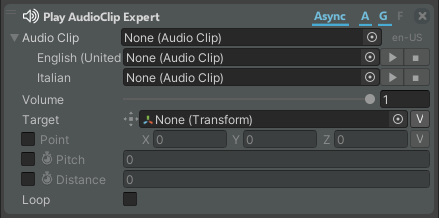
The Play Audio Clip Expert action plays the indicated audio. You can customize the reproduction of the clip in different ways.
| Property | Description |
|---|---|
| Audio Clip | Audio Clip to be played. You can set different audio clips to be played for different languages. |
| Volume | Volume of the audio clip. |
| Target | Object for which the audio is played. If null, the audio is heard on the background of the scene. |
| Point | Position in the coordinate system where to play the audio in respect to the center of the scene. If disabled, the audio is heard on the background of the scene. |
| Pitch | If enabled, the pitch of the audio can be customized. You can animate it. |
| Distance | If enabled, the audio becomes 3D, and the distance is the maximum distance from which you can hear the audio. You can animate it. |
| Loop | If enabled, the audio is reproduced in a loop (this parameter is invisible if the action is not Async). |
Text to Speech Expert
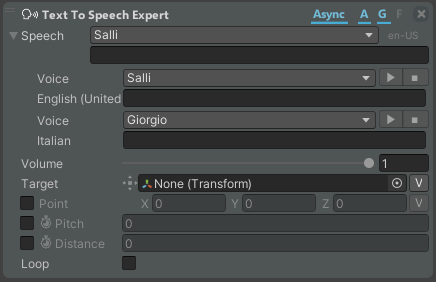
The Text to Speech Expert action plays the indicated TTS. You can customize the reproduction of the TTS in different ways.
| Property | Description |
|---|---|
| Speech | Voice and text to be reproduced. You can reproduce different voices and texts for different languages. |
| Volume | Volume of the audio clip. |
| Target | Object for which the audio is played. If null, the audio is heard on the background of the scene. |
| Point | Position in the coordinate system where to play the audio in respect to the center of the scene. If disabled, the audio is heard on the background of the scene. |
| Pitch | If enabled, the pitch of the audio can be customized. You can animate it. |
| Distance | If enabled, the audio becomes 3D, and the distance is the maximum distance from which you can hear the audio. You can animate it. |
| Loop | If enabled, the audio is reproduced in a loop (this parameter is invisible if the action is not Async). |