Assistant Actions
The Assistant actions drive the in-scene WEAVR Assistant (DAISY): they spawn it, move it around, make it speak, highlight objects and show billboards. If no assistant is present in the scene when the action runs, the spawn and move actions instantiate the default assistant prefab automatically (URP or HDRP, depending on the active render pipeline). See the DAISY page for the full assistant setup.
Assistant Spawn
Instantiates the WEAVR Assistant in the scene (or activates the existing one) at a chosen spawn point.

| Property | Function |
|---|---|
| Custom Assistant | Optional custom assistant prefab to spawn. If left empty, the default prefab for the active render pipeline (URP or HDRP) is used. |
| Spawn Point | The transform where the assistant is placed (position and rotation). |
| Look At Player | If enabled, the assistant turns to look at the player after spawning. |
If an assistant already exists in the scene it is reused (and re-activated if it was disabled) instead of spawning a new one.
Assistant Move
Moves the WEAVR Assistant using one of several movement modes.
| Property | Function |
|---|---|
| Movement Mode | Waypoints = follow a list of waypoints; Transform = move to and follow a target transform; Follow Player = continuously follow the player; Stop Follow Player = stop following the player. |
| Target Transform | (Transform mode) The transform the assistant moves to / follows. |
| Waypoints | (Waypoints mode) The ordered list of waypoints (position, rotation, and optional per-point arrival speed). |
| Speed | The movement speed. |
| Look At Player | Whether the assistant looks at the player when it is not moving. |
| Follow Distance | (Follow Player mode) The distance the assistant keeps from the player while following. |
| Maintain Height | (Follow Player mode) If enabled, the assistant keeps this fixed Y height while following the player. |
Assistant Highlight Object
Makes the assistant point at and highlight a target object, optionally showing a laser.

| Property | Function |
|---|---|
| Target | The object to highlight / point at. |
| Show Laser | If enabled, a laser is drawn from the assistant to the object. |
| Outline Color | The color of the outline highlight applied to the object. |
When the context is exited, the assistant automatically stops pointing and restores its previous Look At Player / Follow Player state.
Assistant Remove Highlight
Stops the current highlight/pointing of the assistant.

| Property | Function |
|---|---|
| Look At Player | Whether the assistant should look at the player after the highlight is removed. |
This only stops the highlight — to remove the assistant from the scene entirely use Assistant Remove below.
Assistant Speech
Makes the assistant speak using Text-to-Speech. This extends the standard Text-to-Speech action, so it shares the same text and voice options and adds an optional billboard. The audio target is set to the assistant automatically, so the voice comes from the assistant.
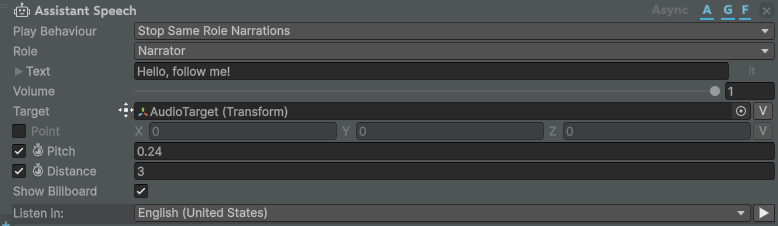
| Property | Function |
|---|---|
| Play Behaviour | How this narration interacts with others (for example Stop Same Role Narrations stops other narrations of the same role before playing). |
| Role | The narration role (for example Narrator). |
| Text | The text the assistant speaks. |
| Volume | The playback volume. |
| Target | The audio source transform. For the assistant this is set to the assistant automatically at runtime. |
| Point | Optional explicit world position for the audio instead of the target. |
| Pitch | If enabled, the voice pitch. |
| Distance | If enabled, the audio max distance. |
| Show Billboard | If enabled, the spoken text is also shown on a billboard above the assistant while it speaks, and hidden when the speech ends. |
| Listen in | The language/voice used for the Text-to-Speech synthesis. |
Show Assistant Billboard
Shows a billboard with custom text above the assistant.

| Property | Function |
|---|---|
| Text | The localized text to show on the billboard. |
| Sample | The billboard prefab to use. If empty, the default billboard sample is used. |
| Theme | If enabled, the billboard theme to apply. If enabled but empty, the default theme is used. |
The billboard is hidden automatically when the context is exited.
Hide Assistant Billboard
Hides the billboard currently shown by the assistant. This action has no additional properties.

Assistant Remove
Removes (destroys) the WEAVR Assistant from the scene. This action has no additional properties.
