Generic Actions
The Generic group contains the following actions:
- Math Expression
- Comment
- Custom Analytics Event
Math Expression
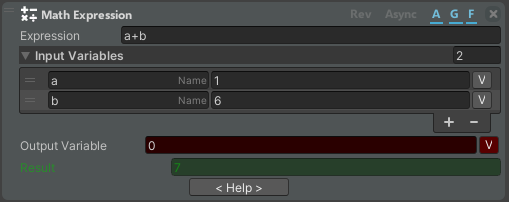
The Math Expression action allows you to perform mathematical functions.
| Property | Description |
|---|---|
| Expression | The function that you want to calculate |
| Input Variables | List of variables |
| Output Variable | Variable where the value is saved (optional) |
| Result | Preview of the result |
Comment
The Comment action lets you add a free-text note to a node's action list. It has no runtime effect and is only meant to document the procedure for whoever edits it.

| Property | Description |
|---|---|
| Comment | The note text. It is shown as the action description (prefixed with //). |
note
The Whitelist Errors action moved to the Error System actions.
Custom Analytics Event
The Custom Analytics Event action sends a custom event to the analytics system, so you can track your own milestones or measurements during a procedure. See Analytics for how these events appear in the Manager Dashboard.

| Property | Description |
|---|---|
| Event Type | (optional) A category for the event. If left empty, it is sent as a generic Procedure Event. |
| Event Name | The name of the event (can be localized). |
| Event Description | The description of the event. It can include variables using the {variableName} format. |
| Event Color | (optional) A color associated with the event, used by the analytics dashboard for visualization. |
| Event Priority | (optional) A priority value; higher numbers indicate higher priority when several events occur together. |
| Additional Fields | Extra key-value pairs to send with the event. The value can also contain variables in the {variableName} format. |