Daisy Actions
The Daisy actions drive DAISY, the in-Player domain assistant: one action adds DAISY to the procedure and configures how it behaves, the other makes it play a predefined speech line. Both actions require the session to be authenticated — if the user is not authenticated when the action runs, it fails and raises an authentication-failed event instead of executing.
Daisy Setup Action
Adds DAISY to the scene and configures it. When the action is executed it instantiates the DAISY prefab at the chosen spawn point and applies the selected behaviour, known objects and instructional videos.
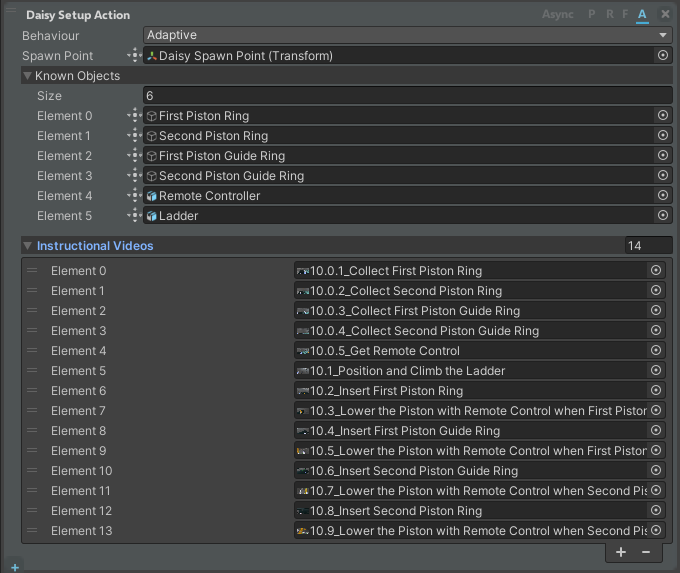
The Behaviour field controls how the assistant acts:
| Behaviour | Description |
|---|---|
| Passive | AI disabled. Only the pre-defined Daisy Speech actions remain enabled. |
| Reactive | The assistant can respond, but does not activate on its own. It intervenes only when the user talks to it. |
| Proactive | The assistant activates autonomously (when it detects an error or the user takes too long on a step) but cannot respond when addressed. |
| Adaptive | The assistant can both respond when the user talks to it and activate autonomously when needed. |
Other fields of the setup action:
| Field | Description |
|---|---|
| Spawn Point | The transform where DAISY appears (position and rotation). |
| Known Objects | The scene objects the assistant must be aware of. |
| Instructional Videos | Demonstration video clips that explain how to perform certain activities. They are shown inside the virtual environment whenever the assistant deems it useful. |
When this action is added to a procedure it also registers a set of DAISY procedure events you can react to (for example with an Event Raised condition): Daisy Connected, Transcription Received, Text Response Received, Voice Response Received, Speech Finished, Speech Text Ready, Response Generation Failed, Highlighted Object, Instructional Board Started and Instructional Board Ended.
DAISY is loaded from a Daisy prefab in a Resources folder. The action only runs for an authenticated session; otherwise it raises the authentication-failed event and does not spawn the assistant. For server addresses and keys, see the DAISY settings.
Daisy Speech Action
Makes DAISY play a predefined speech line. Unlike DAISY's autonomous, AI-generated answers, this is content authored at procedure-creation time, so it plays even when DAISY's behaviour is set to Passive. The action blocks the step until the audio has finished playing, reporting its progress while the clip plays.

| Field | Description |
|---|---|
| Speech | The (localized) text of the line. It is used as the spoken transcript / description of the action. |
| Speech Audio | The (localized) audio clip that DAISY plays back. The action completes when this clip finishes. |
| Delete Speeches | Clears the configured speech text and audio for this action. |
This action plays through the DAISY instance already present in the scene, so it must run after a Daisy Setup Action has added DAISY to the procedure. It also requires an authenticated session.