Hints & Feedback Actions
Show Simple Billboard Action
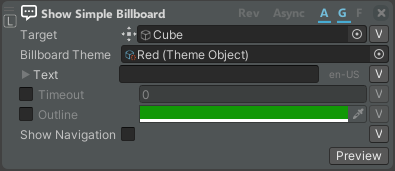
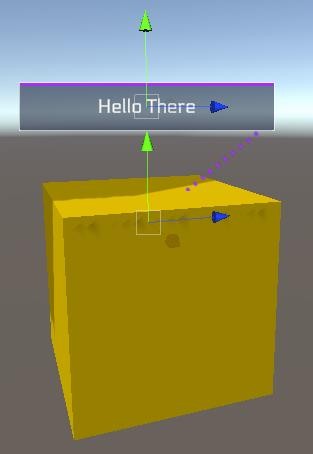
Displays a billboard with text or an image on a target object (minimal configuration).
| Property | Function |
|---|---|
| Target | Define the object from which the billboard will be shown. |
| Billboard Theme | Custom theme for this billboard. If empty, use the default one. |
| Text | Text for the billboard. You can define different texts for different languages. |
| Timeout | If enabled, allows defining the amount of time to show the billboard before disappearing. |
| Outline | If enabled, allows defining the outline color for the target object. If not enabled, the object is outlined until another command removes it. |
| Show Navigation | If enabled, shows the navigation hint to the target object. |
| Preview | If enabled, shows the preview of the billboard on the target object in the scene. |
Show Billboard Action
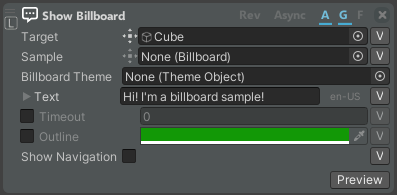
The Show Billboard action allows you to set the billboard text (and other parameters according to the used Billboard Sample), the outline, and the target from which it pops up.
| Property | Function |
|---|---|
| Target | Define the object from which the billboard will be shown. |
| Sample | Define the Billboard sample that will be taken as a reference. If empty, use the default one. |
| Billboard Theme | Custom theme for this billboard. If empty, use the default one. |
| Text | Text for the billboard. You can define different texts for different languages. |
| Timeout | If enabled, allows defining the amount of time to show the billboard before disappearing. |
| Outline | If enabled, allows defining the outline color for the target object. If not enabled, the object is outlined until another command removes it. |
| Show Navigation | If enabled, shows the navigation hint to the target object. |
| Preview | If enabled, shows the preview of the billboard on the target object in the scene. |
Outline Object Action
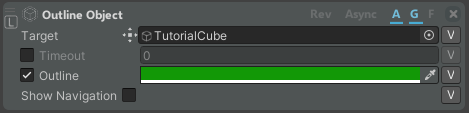

The Outline Object action allows you to set the color of the outline of a target.
| Property | Function |
|---|---|
| Target | Define the object from which the object the outline will be shown. |
| Timeout | If enabled, allows defining the amount of time to show the outline before disappearing. |
| Outline | If enabled, allows defining the outline color for the target object. If not enabled, the object is outlined until another command removes it. |
| Show Navigation | If enabled, shows the navigation hint to the target object. |
Hide Billboard and Outline Action
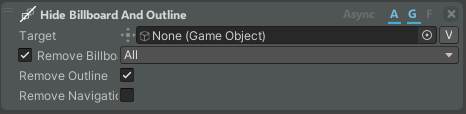
The Hide Billboard and Outline action hides the billboard and/or outline of the target object.
| Property | Function |
|---|---|
| Target | Define the object from which to remove the outline or the billboard. |
| Remove Billboard | If enabled, billboards are removed from the target object according to the selected filter: All = all billboards are removed. By Sample Type = billboards based on the selected Billboard Sample are removed. Last One = last generated billboard is removed. |
| Remove Outline | If enabled, the outline of the target object is removed. |
| Remove Navigation | If enabled, removes the navigation hint to the target object. |
Show Notification Action

The Show Notification action allows you to set a message type and text that will appear as a notification attached to the controller for the defined duration.
| Property | Function |
|---|---|
| Target | Define the type of notification that will appear. |
| Duration | If enabled, define the time to show the notification message. |
| Message | The message that you want to show. Different texts can be set for different languages. |
Hide Notifications Action

The Hide Notifications action allows you to hide the notifications attached to the controller after a delay.
| Property | Function |
|---|---|
| Hide All | If enabled, hide all notifications of every type. |
| Type | Define the type of notification that will disappear. |
| Delay | Delay to wait before hiding notifications. |
Show Billboard Expert
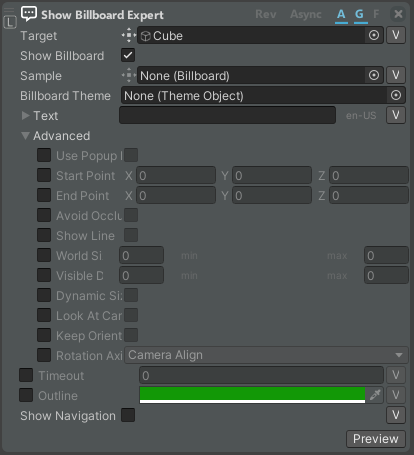
The Show Billboard Expert action allows you to set the billboard on the target object with further customizations of the Billboard Sample parameters.
| Property | Function |
|---|---|
| Target | Define the object from which the billboard will be shown. |
| Show Billboard | If enabled, the billboard appears on the object. |
| Sample | Define the Billboard sample that will be taken as a reference. If empty, use the default one. |
| Billboard Theme | Custom theme for this billboard. If empty, use the default one. |
| Message | If enabled, a text will be shown on the billboard. |
| Text | Text for the billboard. You can define different texts for different languages. |
| Advanced | Advanced settings for text, such as font, alignment, style, etc. |
| Use Popup Point | Whether to use the popup points which stores the start and end points or not. |
| Start Point | The start point of the billboard line. |
| End Point | The end point of the billboard line. |
| Avoid Occlusion | Whether to show the billboard over other objects (even if occluded) or not. |
| Show Line | Whether to show or not the connecting line of the billboard. |
| World Size | The min/max size of the billboard in the world. |
| Visible Distance | The min/max distance at which the billboard is visible. Out of these limits the billboard will fade away. |
| Dynamic Size | Whether to change the billboard size dynamically (based on distance) or not. |
| Look at Camera | Whether to always look at camera or not. |
| Keep Orientation | Whether to keep the billboard in the same position relative to its target. |
| Rotation Axis | How to rotate the billboard with respect to the camera. |
| Timeout | If enabled, allows defining the amount of time to show the billboard/outline before disappearing. |
| Outline | If enabled, allows defining the outline color for the target object. If not enabled, the object is outlined until another command removes it. |
| Show Navigation | If enabled, shows the navigation hint to the target object. |
| Handles | If enabled, the Start Point and End Point transforms appear in the scene. You can move both transforms in the scene to define the correct location of the billboard. |
| Preview | If enabled, shows the preview of the billboard on the target object in the scene. |