Extended Reality Actions
The Extended Reality group contains actions for Augmented Reality and Mixed Reality scenes.
Set AR Object Action
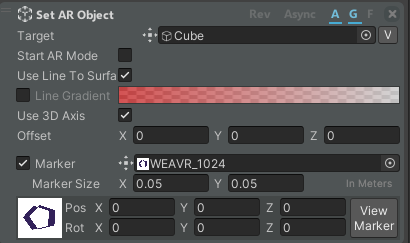
This action works only in Augmented Reality scenes. It allows you to generate an object of your choice after a marker has been framed by the camera.
| Property | Description |
|---|---|
| Target | The object that you want to generate. |
| Start AR Mode | If enabled, your procedure will start in AR. |
| Use Line To Surface | If enabled, your object will be outlined. |
| Line Gradient | If enabled, you can select the gradient color of the outline. |
| Use 3D Axis | Whether to use the 3D Axis for the orientation or not. |
| Offset | The offset to be applied when placing the object. |
| Marker | The marker image to use. |
| Marker Size | The real-world size of the marker. |
| Pos | Position of the object relative to the marker. |
| Rot | Rotation of the object relative to the marker. |
Click on the View Marker button to see the marker inside the scene and edit its position and rotation.
Toggle Environment
Shows or hides the mixed-reality environment with a fade animation. It works with the MR Environment Manager; see Mixed Reality.

| Property | Description |
|---|---|
| Enable | If enabled, the environment is shown; if disabled, it is hidden. |
| Duration | Duration, in seconds, of the fade animation (default 2). |