Interaction Actions
Door Lock Action

| Property | Function |
|---|---|
| Target | Target door lock |
| Lock | If enabled, locks the door lock. |
Simple Door Action

The simple door action allows you to control a GameObject with a Door component on it.
| Property | Function |
|---|---|
| Target | Target door |
| Door State | The state in which we want to set the door. |
| Is Locked | Whether the door is locked or not. |
Connectable Action

| Property | Function |
|---|---|
| Connectable | Connectable object to connect or disconnect |
| Target | Reference target where the connectable will be attached |
| Point | Specified point where the connectable will be attached |
| Connect | If enabled, connect all the connectable to the specified target and point |
| Disconnect All | If enabled, disconnect all the connectables connected to the specified target and point |
Executable Action

The executable action allows you to control a GameObject with an Executable component on it.
| Property | Function |
|---|---|
| Target | Target executable |
Push Button Action

The executable action allows you to control a GameObject with a Push Button component on it.
| Property | Function |
|---|---|
| Target | Target push button |
| Push | Set the state to "push" |
| Can Change State | Whether this button can change state. |
Teleport Action

The teleport action allows you to teleport the PlayerRIG to a point inside the scene. Works only in a VR environment.
| Property | Function |
|---|---|
| Target | Target playerRIG |
| Teleport Point | Teleport destination |
| Rotate | Whether the RIG can rotate or not. |
Toggle WEAVR Interaction Action

This action allows you to enable/disable a specific WEAVR Interaction on an object.
| Property | Function |
|---|---|
| Target | Target object |
| WEAVR Interaction | The WEAVR Interaction to be enabled/disabled |
| Enable | Enable/disable the interaction |
Toggle WEAVR Object Action

The Toggle WEAVR Object action allows you to enable/disable a WEAVR Object component.
| Property | Function |
|---|---|
| Target | Target WEAVR Object |
| Enable | Enable/disable target WEAVR Object |
Toggle All WEAVR Objects Action

This component allows you to enable/disable all WEAVR Objects inside the scene.
| Property | Function |
|---|---|
| Set Enabled | Enable/disable WEAVR Objects |
| Inactive Objects | Enable/disable inactive objects |
VR Pointer Action

The VR Pointer action allows you to show a pointer in a VR procedure.
| Property | Function |
|---|---|
| On Hand | The hand on which to use the pointer. |
| Show | Show/Hide the pointer. |
Set Movement Type Action

This action allows you to change the VR movement type during procedure.
| Property | Function |
|---|---|
| Target | The target (PlayerVR). |
| Left Controller | The type of movement associated with left controller. |
| Right Controller | The type of movement associated with right controller. |
Path Movement Action
Controls a Path Movement interaction, driving it to a given state or value (and restoring the previous one when the context is exited).

| Property | Function |
|---|---|
| Target | The Path Movement interaction to control. |
| Move Type | Whether to drive the path movement by State or by Value. |
| State | (Move Type = State) The state index to set. |
| Value | (Move Type = Value) The position along the path to set (0–1). |
Expert Door Action

The expert door action allows you to control in a more precise way a GameObject with a Door component on it.
| Property | Function |
|---|---|
| Target | Target door |
| Door State | The state in which we want to set the door. |
| Open Value | If enabled, set the open value of this door |
| Is Locked | Whether the door is locked or not. |
| Add Open Value | If enabled, add an open value to this door. |
Change Interaction Name Action
Changes the on-screen name and icons of the commands of a WEAVR interaction during the procedure — for example, to relabel a door's "Open" command, or to give a button a context-specific name and icon as the trainee progresses.
| Property | Function |
|---|---|
| Interaction | The WEAVR interaction (Door, Push Button, etc.) whose commands you want to relabel. |
| Command Overrides | For each command of the interaction, the new Name and Icon to show in the Player. |
This action is not included in the default Actions catalogue. If you need it, add it to your Actions catalogue first.
Set Paint Brush Action
Creates or configures a Brush on the target object during a procedure. Every option has an enable to override checkbox: only the enabled options are applied to the brush, the others keep their current values.
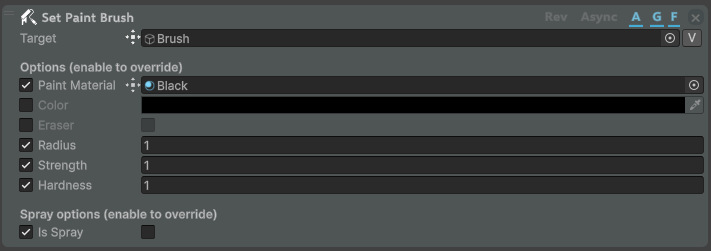
| Property | Function |
|---|---|
| Target | The object with the Brush component (or where one is added). |
| Paint Material | Use this material's look for the paint. |
| Color | An explicit paint color (a paint material, if enabled, takes precedence). |
| Eraser | Erase instead of paint. |
| Radius | Fallback / spray radius in world units. |
| Strength | How much paint is deposited (0–1). |
| Hardness | How sharp the painted edge is (0–1). |
| Is Spray | Switch the brush to spray-cone mode. When enabled, extra spray options appear: Spray Origin, Spray Distance, Spray Angle and Spray Falloff. |
Set Paint Brush Enabled Action
Enables or disables the Brush component on an object during a procedure.

| Property | Function |
|---|---|
| Target | The object whose Brush should be enabled or disabled. |
| Enabled | Whether the Brush is enabled (uncheck to disable it). |
Set Paintable Action
Marks an object as paintable during a procedure by adding (and configuring) a Paintable component.

| Property | Function |
|---|---|
| Target | The object to make paintable. |
| Resolution | The paint detail level (Low, Medium, High, Max). |
| Include Children | If enabled, the child meshes are made paintable too. |