Procedure Build
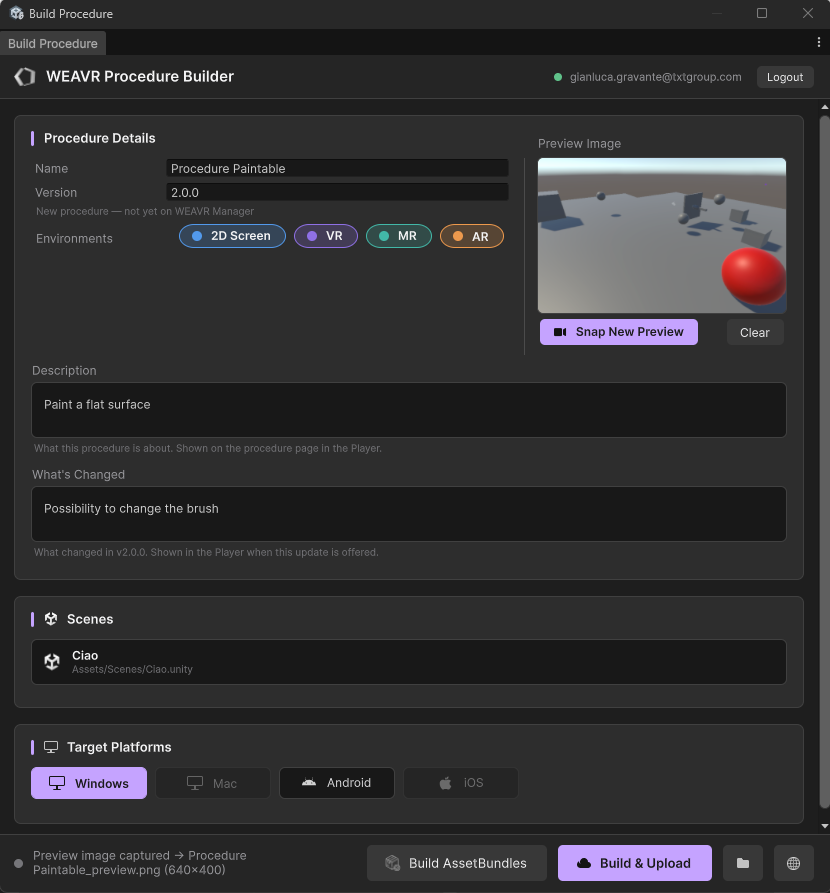
Once you have finished creating and testing your procedure, it's time to build and upload it to the WEAVR Manager. Open the WEAVR Procedure Builder from the Build button inside the Procedure editor.
Build Window
The builder window is organized in a few sections:
| Section | Description |
|---|---|
| Procedure Details | The procedure Name and Version (a note indicates whether it is new or already on the WEAVR Manager) and the target Environments (2D Screen, VR, MR, AR). |
| Description | What the procedure is about. It is shown on the procedure page in the Player. |
| What's Changed | What changed in this version. It is shown in the Player when the update is offered to the user. |
| Preview Image | The image shown for the procedure. Use Snap New Preview to capture the current Scene view as the preview, or Clear to remove it. |
| Scenes | The scene(s) included in the procedure build. |
| Target Platforms | The platform(s) the procedure is built for: Windows, Mac, Android, iOS. |
note
Building and uploading connects to the WEAVR Manager, so you need to be signed in. See Login & License.
Building the Procedure
At the bottom of the window you have two actions:
- Build AssetBundles — builds the procedure locally (the folder button opens the output folder).
- Build & Upload — builds the procedure and uploads it directly to the WEAVR Manager.
See the WEAVR Manager section for documentation on how procedures appear once uploaded.